There's a merchant in Ohio — call her Dana — who spent last quarter doing everything the playbook says. She rewrote her product descriptions. She fixed her collection structure. She ran a Google Ads campaign that actually converted. Then one evening, between packing orders, she asked ChatGPT the question her customers ask: "What's the best ceramic pour-over dripper under $50?"
Three of her competitors came back with citations. Her store didn't exist.
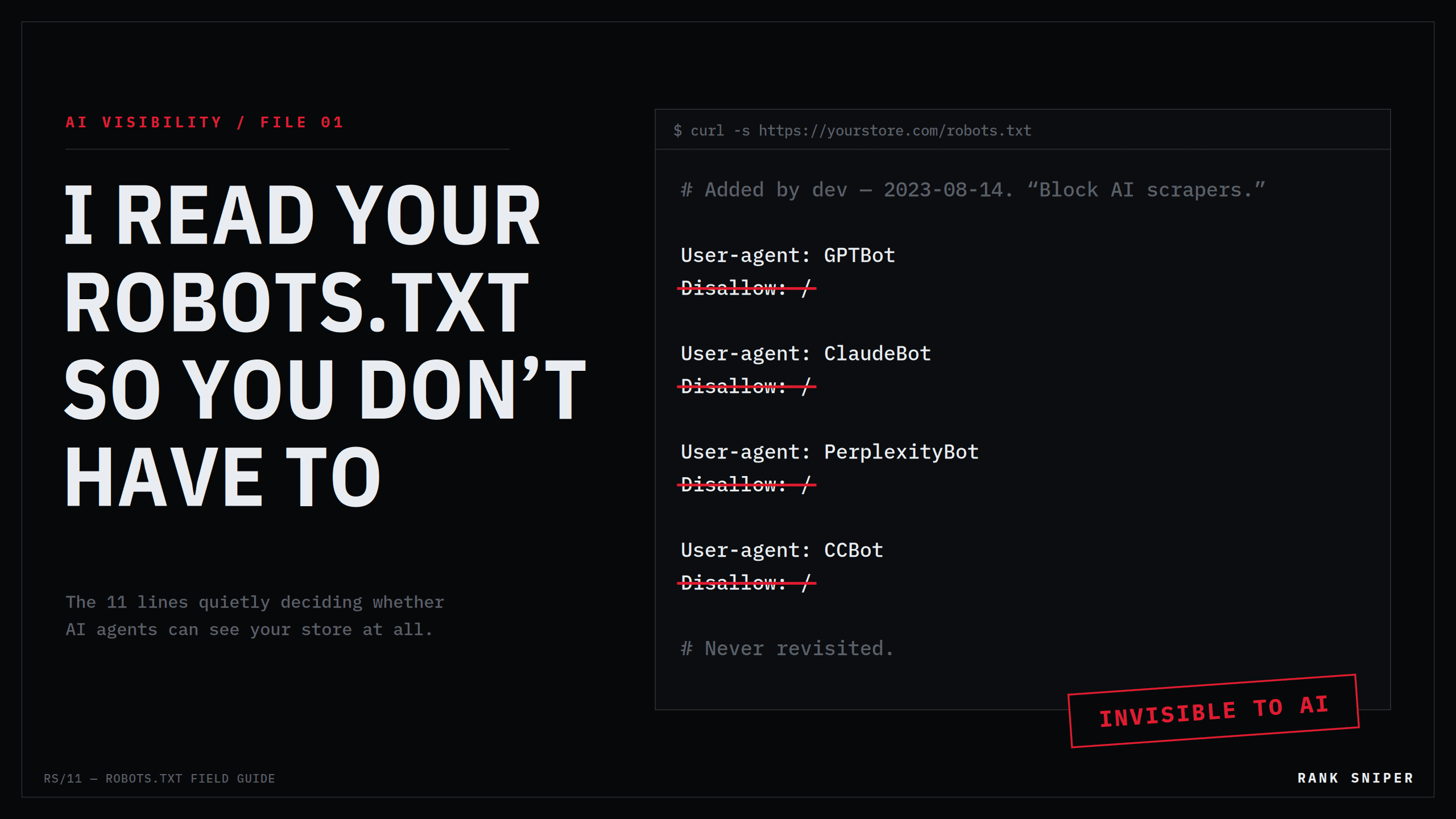
Not "ranked low." Not "mentioned without a link." Did not exist. And the reason wasn't her products, her prices, or her content. It was eleven lines of text in a file she had never opened, pasted there by a well-meaning developer in 2023, doing exactly what it was told to do: keep AI out.
This article is about that file. By the end of it, you'll know every AI crawler that matters to a Shopify store in 2026, what each one actually does, the three ways stores block them without knowing, and how to audit your own store in about fifteen minutes. No tool required. Just your eyes and a text file.
The file that decides whether machines can read your store
robots.txt is a plain-text file that lives at the root of your domain — yourstore.com/robots.txt — and tells crawlers which parts of your site they may read. It's older than Google. It runs on the honor system. And for twenty-five years, the only bots anyone cared about were search engine crawlers, which every platform allowed by default.
Then AI companies started sending their own crawlers, and site owners split into two camps. One camp saw "AI is scraping my content" and blocked everything. The other camp didn't know the file existed. Both camps are now invisible in a channel that answers shopping questions with citations — and only one of them chose it.
"AI bots" is not one thing. Blocking the training crawler does not block the search crawler.
The major AI companies each run multiple crawlers with different jobs, and they must be addressed separately. If your robots.txt was written before 2026 — or copied from a blog post that was — it almost certainly doesn't reflect what you actually intended.
Meet the crawlers: who's knocking, and why
These are the documented user-agents that determine whether your store appears in AI answers. Each vendor's official documentation is linked at the end — every claim below comes from those pages, not from folklore.
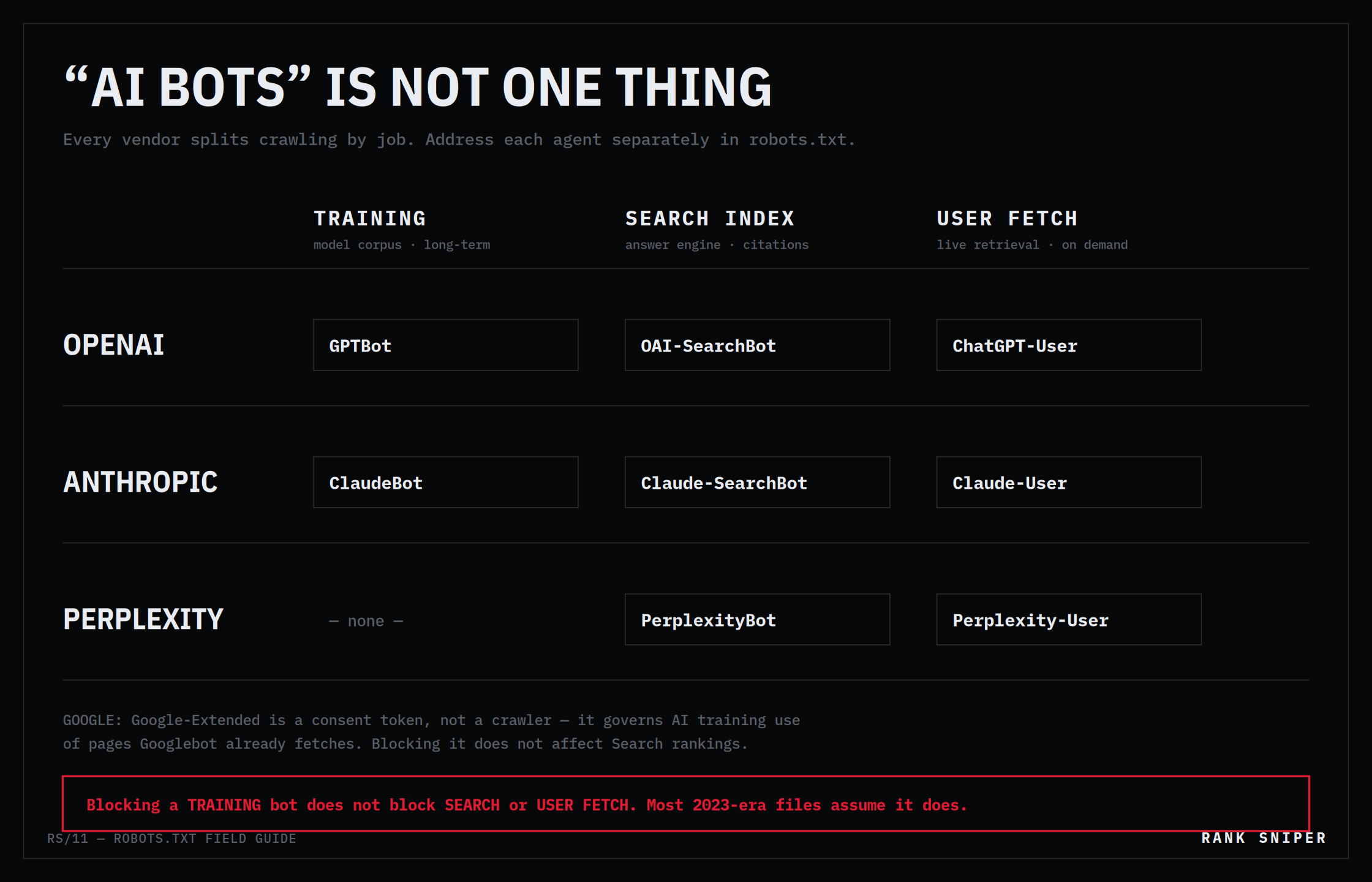 FIG.02 — One vendor, three bots. Each column is a separate decision in your robots.txt.
OpenAI runs three
GPTBot is the training crawler. It collects public web content that may be used to train OpenAI's foundation models. Blocking it opts your future content out of training datasets — and has nothing to do with whether ChatGPT can cite you today.
OAI-SearchBot is the search index crawler — the one that determines whether your pages can appear in ChatGPT's search results. OpenAI's documentation is unusually blunt: sites that opt out of OAI-SearchBot will not be surfaced in ChatGPT search answers. If you sell things and you block this bot, you have removed yourself from the shelf.
ChatGPT-User is the user-triggered fetcher. When a person asks ChatGPT something that requires visiting a live page — your current price, your shipping policy — this agent makes the request on their behalf. It doesn't crawl autonomously. Its fingerprint in your server logs:
Mozilla/5.0 AppleWebKit/537.36 (KHTML, like Gecko);
compatible; ChatGPT-User/1.0; +https://openai.com/bot
OpenAI publishes the IP ranges for all three, so log verification is possible — a courtesy not every vendor extends.
Anthropic runs three (as of February 2026)
Anthropic formalized the same three-tier structure this year, and this is where a lot of older robots.txt files silently went stale: ClaudeBot for training data, Claude-SearchBot for search indexing, and Claude-User for pages fetched when a Claude user asks a question that requires one. Anthropic's own documentation warns that blocking Claude-SearchBot "may reduce your site's visibility and accuracy in user search results."
Two operational details worth knowing. First, Anthropic states all three bots honor robots.txt — including the user-triggered one, which is stricter than some competitors' policies. Second, Anthropic does not publish IP ranges, and warns that IP-blocking is unreliable because its bots use public cloud infrastructure. robots.txt is the control surface. Use it.
The trap: a file that blocks ClaudeBot by name — common in 2024-era snippets — blocks only training. If your intent was "no Claude at all," you're not doing that. If your intent was "block training, allow citations," you're accidentally correct. Either way, you should know which one you are.
Perplexity runs two
PerplexityBot indexes content to power Perplexity's answer engine; Perplexity-User fetches pages when a user's question requires live retrieval. Perplexity answers shopping queries with product citations aggressively. Blocking these two bots means zero Perplexity citations. Not fewer. Zero.
The consent tokens: Google-Extended and friends
Google-Extended is not a crawler. It's a control token: it tells Google whether content Googlebot already fetches may be used for Gemini training and grounding. Blocking it does not affect your Google Search rankings — Googlebot and Google-Extended are governed independently. Applebot-Extended works the same way for Apple's models. This matters because "block Google-Extended to protect rankings" and "allow it or lose rankings" are both myths, and both circulate in Shopify forums.
The ones you can reasonably block
Not every bot deserves access. Bytespider (ByteDance) has a documented history of ignoring robots.txt. CCBot (Common Crawl) feeds open datasets used for training by many parties. Whether you block these is a policy choice, not a visibility choice — none of them cite you back.
That's the entire mental model: training crawlers shape whether models know your brand exists months from now; retrieval and search bots decide whether your URL gets cited in an answer today. You can hold different policies for each. Most stores never made either decision on purpose.
The three ways stores go dark without knowing
1 — The 2023 snippet that never got revisited
Shopify lets you override the default robots.txt through a theme template called robots.txt.liquid. In 2023, when "block AI scrapers" was the prevailing advice, thousands of stores pasted blanket-block snippets into that template. The advice was defensible then — AI answers didn't drive purchases. It is actively costing money now, and the file has no expiry date. It sits in the theme, doing its job, long after its job stopped making sense.
Worse: those snippets predate the bot splits. They block GPTBot and ClaudeBot — the training bots — while the search bots those vendors launched later sail through, or vice versa. The store's actual policy is whatever a 2023 blog post happened to say, filtered through three years of vendor changes nobody tracked.
2 — The app toggle you didn't know you flipped
Several popular SEO apps added "block AI bots" switches in 2024–2025 — some enabled by default, some enabled during an update. Merchants have cut themselves off from ChatGPT, Claude, and Perplexity overnight by updating a plugin. If an app writes to your robots.txt or injects crawler directives, its settings are part of your crawler policy whether you've read them or not.
3 — The firewall that says yes and means no
This is the subtle one. Your robots.txt can allow a bot while your CDN or WAF blocks it anyway. Cloudflare's bot-management features — including the one-click AI-scraper block introduced in 2024 — drop AI crawler traffic at the edge, before it ever reaches Shopify. Aggressive rate limits produce 429 Too Many Requests responses that make crawlers classify your store as hostile and move on.
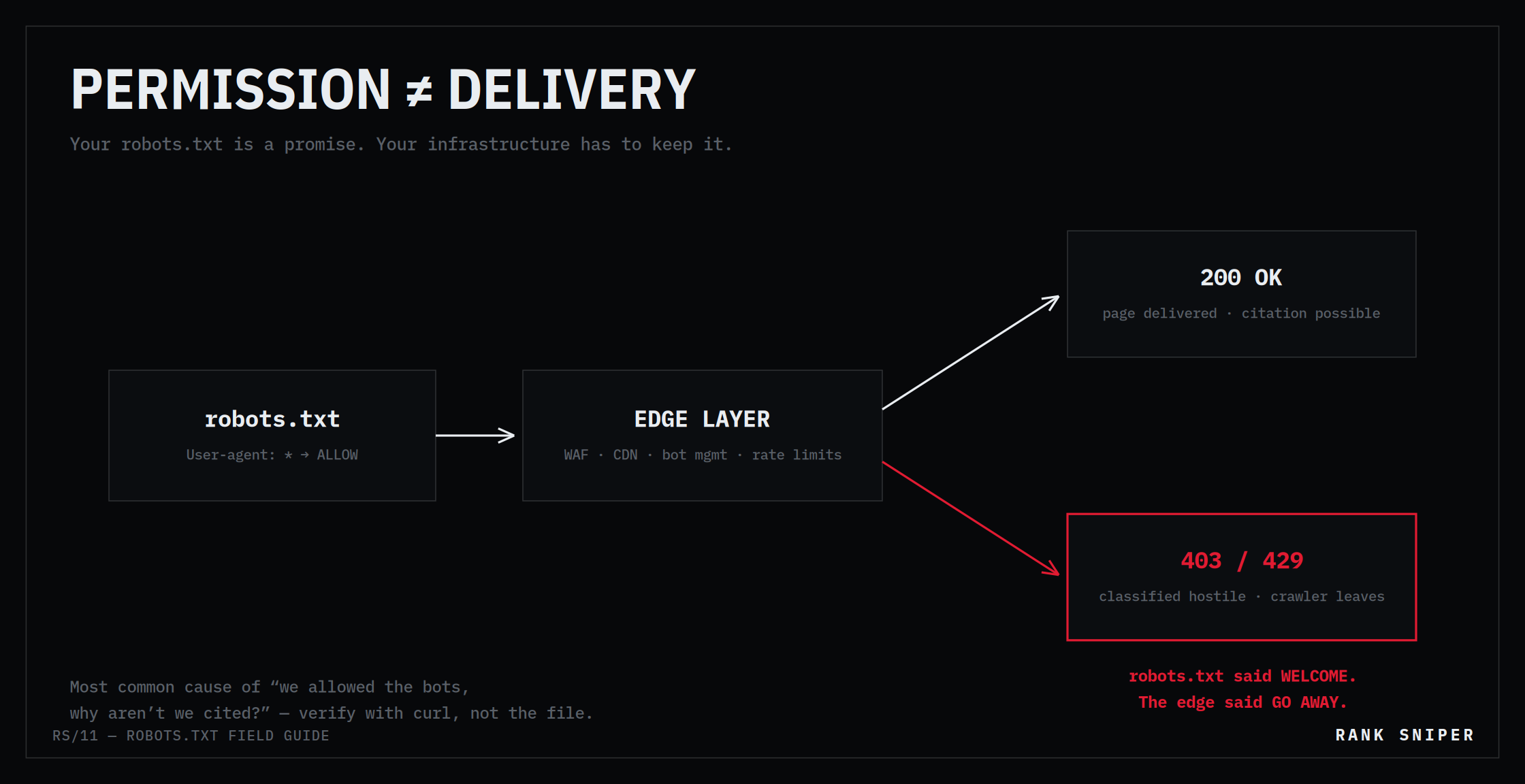 FIG.03 — Permission is not delivery. The most common cause of "we allowed the bots, why aren't we cited?"
The symptom is maddening: robots.txt says welcome, server logs say nobody came. In enterprise audits, this WAF-versus-robots.txt mismatch has been one of the most common reasons for missing ChatGPT citations despite an open crawler policy. Your robots.txt is a promise. Your infrastructure has to keep it.
The fifteen-minute audit
STEP 01 / READ THE FILE. Open yourstore.com/robots.txt in a browser. Shopify's default blocks transactional paths (/cart, /checkout, /account — correctly; agents have no business indexing your checkout) and allows reputable crawlers. If you see user-agent blocks for GPTBot, ClaudeBot, PerplexityBot, or anything with "AI" in a comment, someone customized it. Find out who, and when, and whether the reasoning survives 2026.
STEP 02 / CHECK THE TEMPLATE OVERRIDE. In Shopify admin: Online Store → Themes → Edit code, look for templates/robots.txt.liquid. No file means Shopify defaults are live. If the file exists, its contents are your policy — read every line.
STEP 03 / VERIFY DELIVERY, NOT JUST PERMISSION. Fetch a product page the way a bot would:
curl -A "Mozilla/5.0 AppleWebKit/537.36 (KHTML, like Gecko); \
compatible; OAI-SearchBot/1.0; +https://openai.com/searchbot" \
-s -o /dev/null -w "%{http_code}" \
https://yourstore.com/products/your-best-seller
A 200 means the search bot gets your page. A 403 or 429 means something upstream — WAF, CDN, bot management — is overriding your stated policy. Repeat with the other user-agent strings. Five minutes of curl tells you more than any dashboard.
If you want the corrected end-state, here is a reference configuration for a store that wants full AI visibility while keeping training as a deliberate, separate choice:
# Live retrieval & search — this is where citations come from
User-agent: OAI-SearchBot
Allow: /

User-agent: ChatGPT-User
Allow: /

User-agent: Claude-SearchBot
Allow: /

User-agent: Claude-User
Allow: /

User-agent: PerplexityBot
Allow: /

User-agent: Perplexity-User
Allow: /

# Training crawlers — your policy choice; visibility today
# does not depend on these
User-agent: GPTBot
Allow: /

User-agent: ClaudeBot
Allow: /

# Known robots.txt non-respecters / no citation value
User-agent: Bytespider
Disallow: /
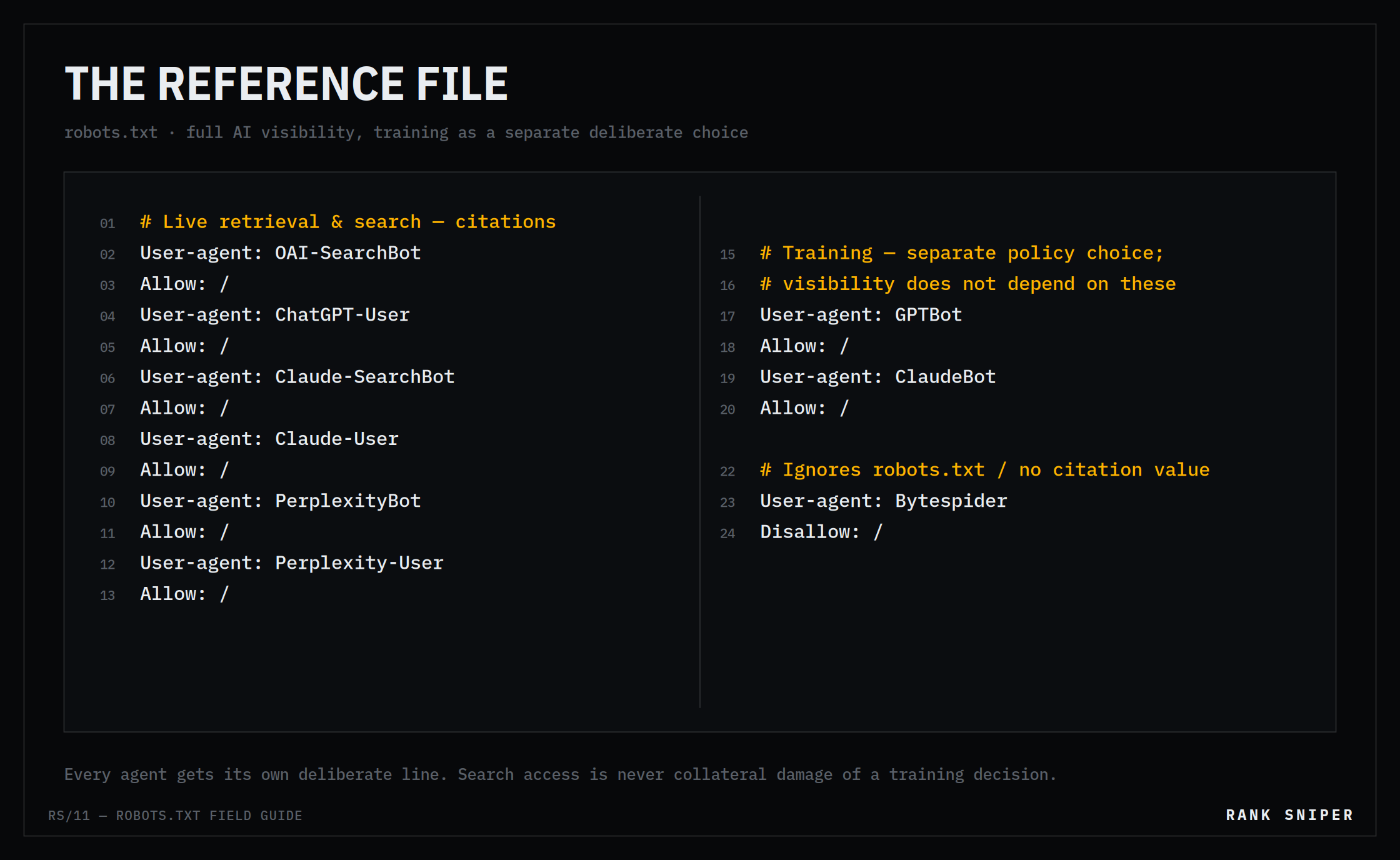 FIG.04 — The reference file. Every agent gets its own deliberate line; search access is never collateral damage of a training decision.
Adapt it to your policy — the point is that every agent gets its own deliberate line, and search access is never collateral damage of a training decision.
Access is the floor, not the finish line
Here's the honest caveat, and it's where this series is headed: an open robots.txt gets the crawler in the door. It says nothing about what the crawler finds when it arrives.
An AI agent that reaches a product page still has to answer questions a human never consciously asks. Is there machine-readable structured data declaring the price, or is the price a styled <div> rendered by JavaScript the bot never executes? Does the markup state availability, or does "In Stock" exist only as pixels? Is there a GTIN, a canonical identity, an unambiguous variant structure — or is the product, from a machine's perspective, an untyped blob of prose?
Crawler access and catalog legibility are separate layers, and they fail independently. A store can be perfectly open and still be unquotable. That second layer — what the agent actually receives versus what your theme claims to declare — is its own discipline, with its own audit, and it's where most "we allowed the bots, why aren't we cited?" mysteries actually live. We measure that gap for a living, and it deserves its own article. (It's next.)
For today: open your robots.txt. Read it like it's costing you money — because if it was written before this year, it probably is. Dana's fix took eleven minutes. Her store started appearing in Perplexity answers within weeks. The file had simply been doing what it was told.
Make sure yours is telling it what you actually mean.
Sources & further reading
Every vendor claim in this article derives from the operator's own documentation. Bookmark these — they change, and your robots.txt should change with them:
- OpenAI — Overview of OpenAI crawlers (GPTBot, OAI-SearchBot, ChatGPT-User, UA strings, published IP ranges): https://platform.openai.com/docs/bots
- Anthropic — Does Anthropic crawl data from the web? (ClaudeBot, Claude-SearchBot, Claude-User; robots.txt & Crawl-delay support; updated Feb 2026): https://support.claude.com
- Perplexity — Perplexity crawlers (PerplexityBot, Perplexity-User): https://docs.perplexity.ai/guides/bots
- Google — Google crawlers and fetchers (Googlebot vs. Google-Extended): https://developers.google.com/search/docs/crawling-indexing/overview-google-crawlers
- Shopify — robots.txt.liquid template: https://shopify.dev/docs/storefronts/themes/architecture/templates/robots-txt-liquid
- IETF RFC 9309 — Robots Exclusion Protocol (the actual standard): https://www.rfc-editor.org/rfc/rfc9309
Rank Sniper — Field Notes. Catalog legibility and AI-visibility verification for Shopify. We verify what AI agents actually receive from your store; we don't generate content and hope. Verifier, not generator.