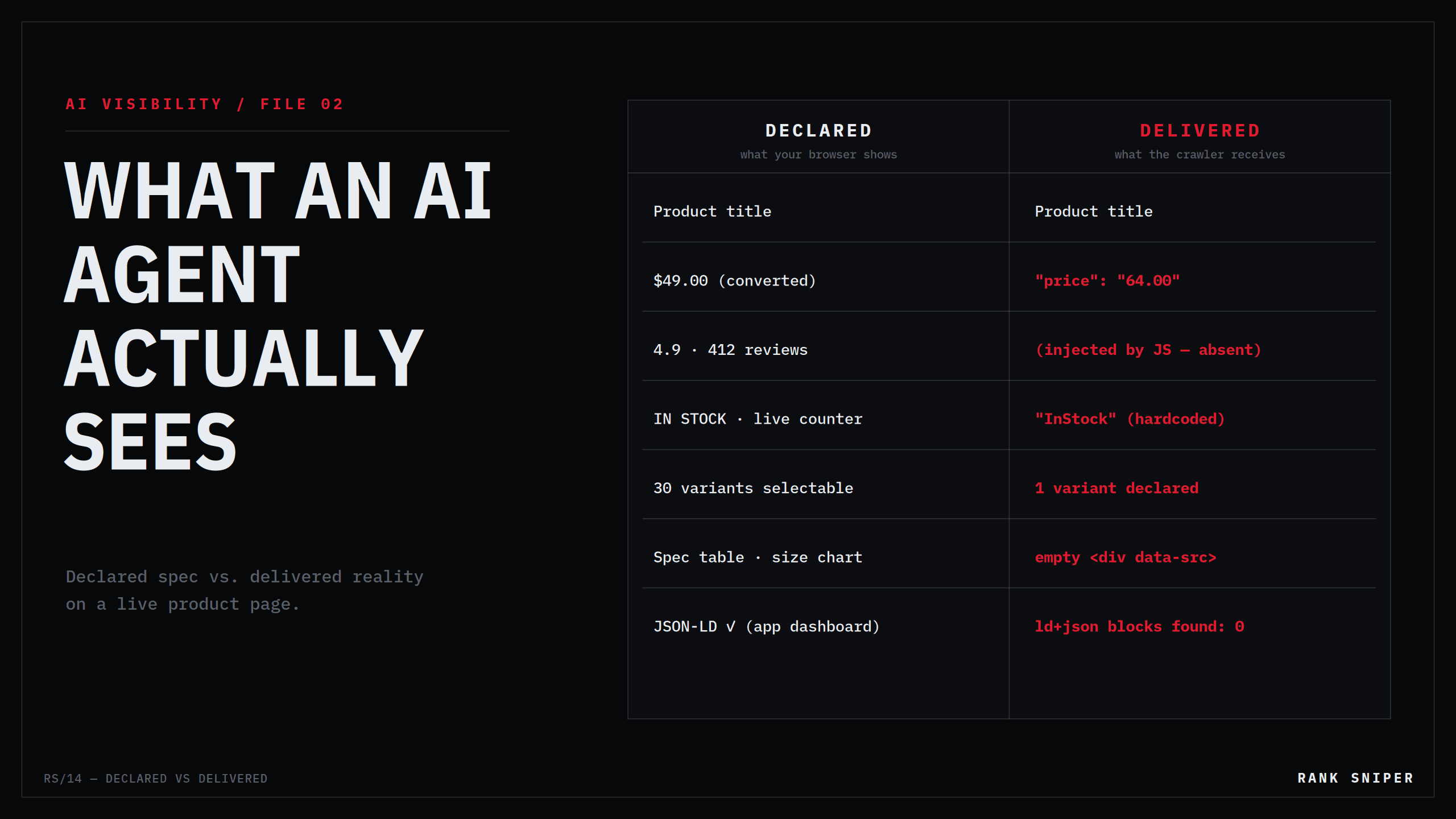
Marcus sells technical backpacks. His product page is genuinely good: review stars under the title, live stock counter, a currency-converted price, rich variant pickers, structured data that lights up green in Google's Rich Results Test. He's done the work. He even opened his robots.txt after reading about AI crawlers, and it's clean — every search and retrieval bot welcomed by name.
Then a customer mentions they asked ChatGPT to compare travel backpacks. The answer quoted a competitor's price and stock status down to the variant — and described Marcus's flagship bag with a shrug: price and availability unknown.
Both stores were crawlable. Both pages "had schema." The difference is that the competitor's product data was in the HTML the crawler received, and most of Marcus's was assembled afterward, in the browser, by JavaScript — a performance no crawler stayed to watch.
This is the gap this article is about: declared spec versus delivered reality. What your stack claims to publish, versus the bytes a machine actually receives. It's the least visible layer of AI visibility, it's where the most confident merchants fail, and you can audit it yourself in about fifteen minutes with view-source and curl.
Two truths about the same product page
Every product page exists in two versions.
The declared version is the one your tooling reports: the theme "includes JSON-LD," the review app "adds star ratings," the SEO app dashboard shows a green checkmark next to Structured Data. It's the page as described by the things that build it.
The delivered version is the raw HTTP response — the exact bytes returned to whoever asked, before a single line of JavaScript runs. This is the only version a non-rendering crawler will ever see. If a fact isn't in those bytes, then as far as that machine is concerned, the fact does not exist.
For twenty years the gap between these two versions barely mattered, because the crawler that counted — Googlebot — invested in closing it. Google runs a full rendering pipeline: pages are fetched, queued, and executed in a headless Chromium so that JavaScript-injected content is eventually seen. Slower, sometimes deferred, but seen.
AI crawlers made no such promise. Nothing in OpenAI's, Anthropic's, or Perplexity's crawler documentation commits to executing JavaScript, and independent log analyses — most prominently Vercel's large-scale study of AI crawler behavior — found these bots fetching HTML and skipping rendering entirely. The practical rule for 2026 is blunt:
Googlebot renders. AI crawlers read the raw response. Anything your page assembles client-side is invisible to the machines writing the answers.
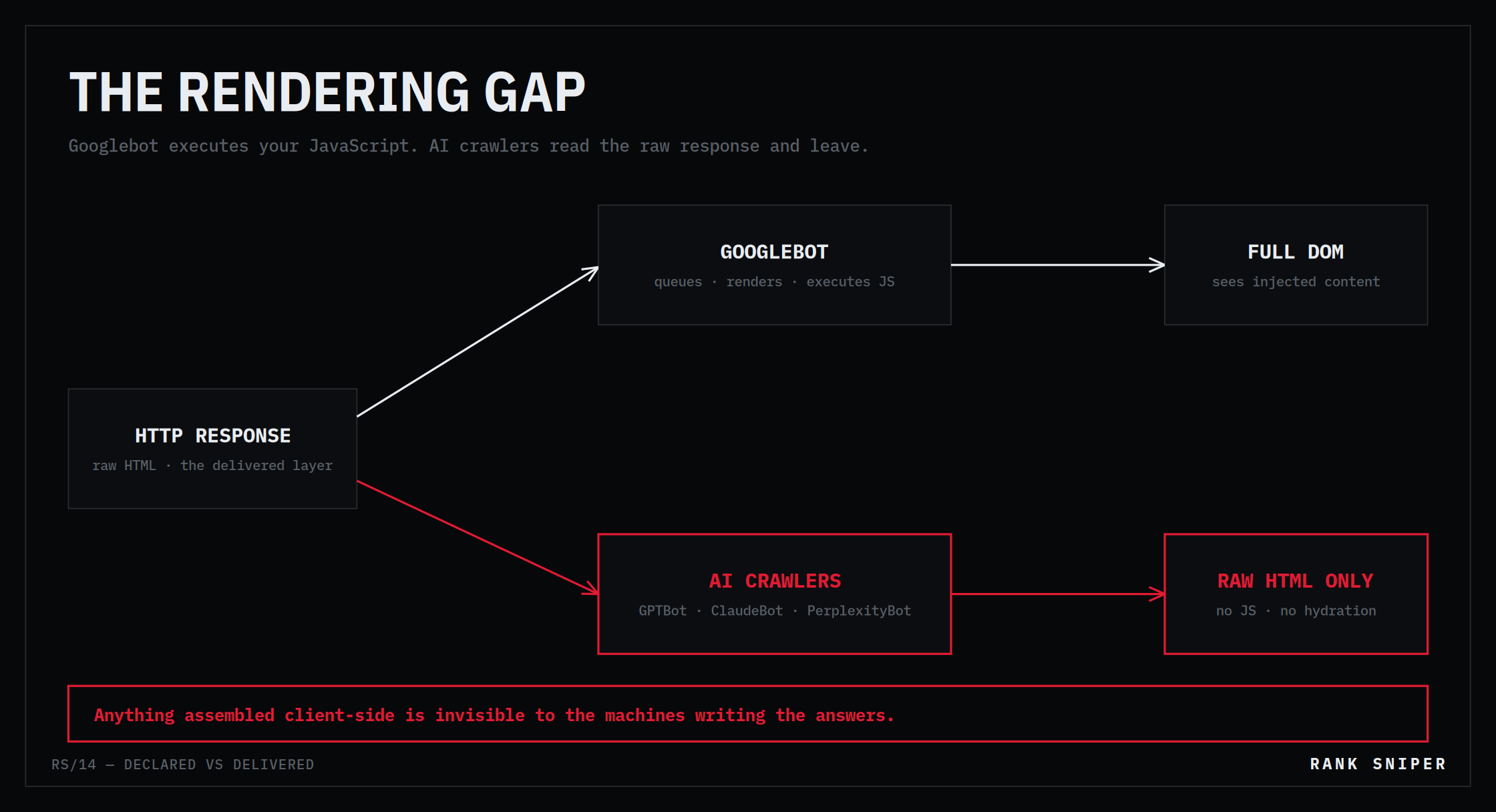 FIG.02 — The same response, two outcomes. Googlebot executes your JavaScript; GPTBot, ClaudeBot and PerplexityBot read what came back and leave.
That single asymmetry quietly reorders a decade of front-end habits. Client-side rendering, app-injected markup, hydration-dependent content — patterns that were "fine, Google renders it" — are now a visibility tax paid in the fastest-growing channel you have.
The six gap classes
Auditing Shopify stores against their raw responses turns up the same failures again and again. Six classes cover almost everything.
1 — App-injected JSON-LD. Many review, SEO, and schema apps add their structured data via script after page load — the tag exists in the rendered DOM, not in the HTTP response. The dashboard says "schema installed." The delivered HTML says nothing at all. This is the cruelest class because every tool the merchant checks reports success.
2 — Hardcoded availability. Countless theme templates emit "availability": "https://schema.org/InStock" as a literal string — not bound to inventory. The declared spec says your stock status is published; the delivered reality is that every product claims InStock forever, including the ones that sold out in March. To an agent deciding whether to recommend a purchasable product, a store that's wrong about availability is worse than one that's silent: it's a source that can't be trusted on the one field that matters most.
3 — Price divergence. Currency converters, sale-badge scripts, and bundle apps rewrite the displayed price in the browser while the JSON-LD price sits at the original value. The human sees $49 after the script runs; the machine reads $64 from the markup. When a shopping agent cross-checks and the numbers disagree, the safe move — the one agents take — is to drop the listing.
4 — Variant collapse. One Product schema block, thirty variants, and the markup declares only the first variant's price and stock. "Does it come in the 40L, and is that in stock?" is unanswerable from the delivered data — the page has collapsed thirty answers into one, usually the wrong one.
5 — Client-side ratings. Star widgets that render entirely in JavaScript, with any rating markup injected the same way. Whatever social proof you've earned is invisible in the raw response. (And to be clear: rating markup belongs only where real, displayed reviews exist — fabricating it is a different failure with its own penalties.)
6 — Lazy-loaded substance. Description tabs, spec tables, size charts, and images that hydrate on scroll or click, leaving data-src placeholders and empty containers in the HTML. The content exists for a human who interacts. The crawler doesn't interact.
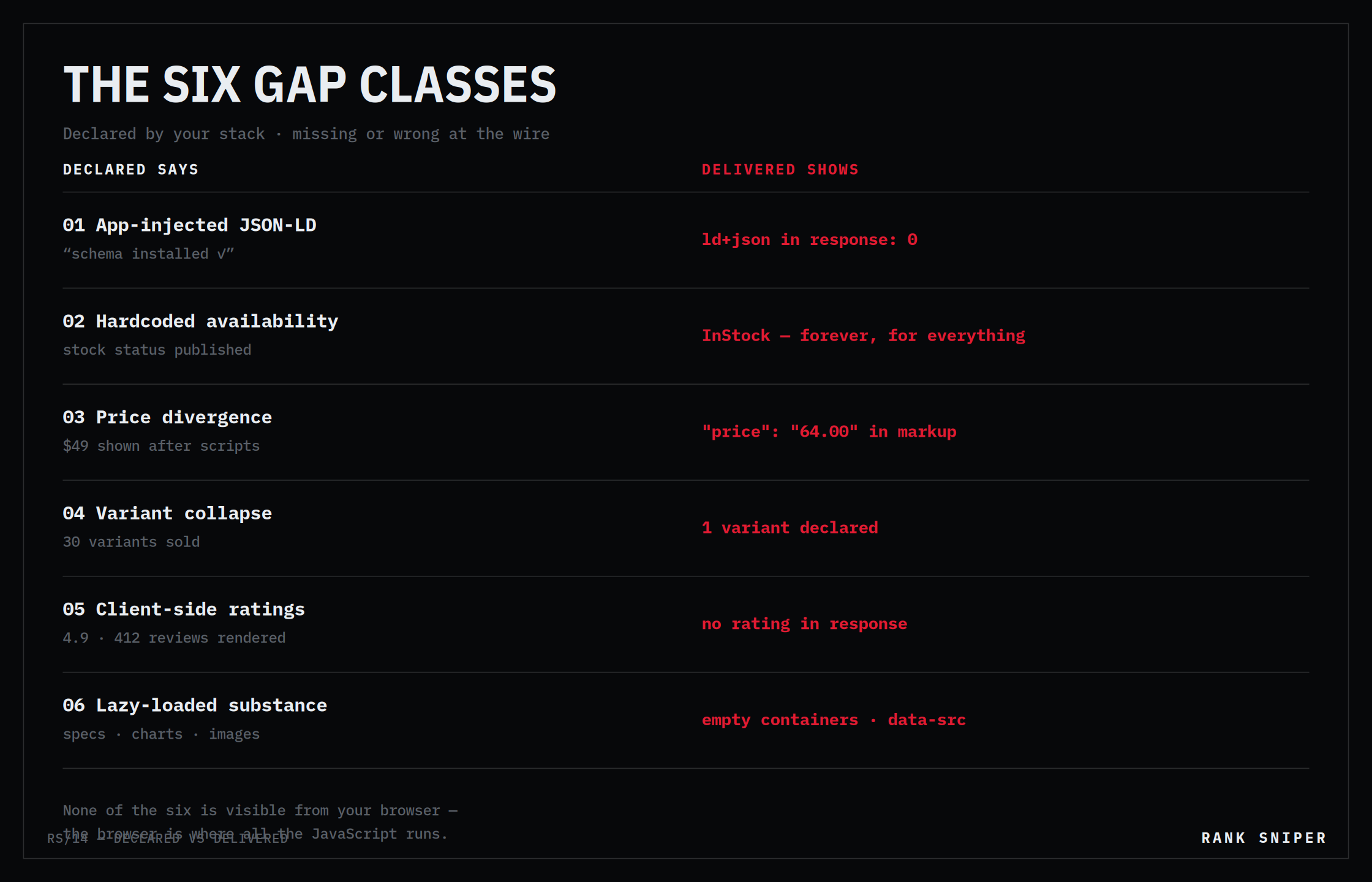 FIG.03 — Six ways the declared layer and the delivered layer disagree. Every left-hand column is something a dashboard reports as working.
Notice the pattern: not one of these is visible from the browser. The page looks perfect, because the browser is the one place where all the JavaScript runs. The gap only appears when you look at what was actually delivered — which is exactly what the audit does.
The fifteen-minute audit
STEP 01 / VIEW SOURCE, NOT INSPECT. Open your best-selling product page. Hit Ctrl+U (view-source) — this is the delivered response. Now open DevTools and compare against the rendered DOM. Anything present in DevTools but absent from view-source was built by JavaScript and does not exist for an AI crawler. Check the big four: JSON-LD block, price, availability, description.
STEP 02 / COUNT THE SCHEMA AT THE WIRE. Ask for the page the way a bot does, and count structured-data blocks in the raw response:
curl -s -A "Mozilla/5.0 AppleWebKit/537.36 (KHTML, like Gecko); \
compatible; OAI-SearchBot/1.0; +https://openai.com/searchbot" \
https://yourstore.com/products/your-best-seller \
| grep -c 'application/ld+json'
A count of 0 while your SEO app shows green means your schema is injected client-side — declared, never delivered.
STEP 03 / READ WHAT THE MARKUP ACTUALLY CLAIMS. Pull the delivered price and availability and check them against reality:
curl -s https://yourstore.com/products/your-best-seller \
| grep -oE '"(price|availability)"\s*:\s*"[^"]*"'
Now the hard questions. Is that the price a human sees after your scripts run? Does availability track inventory, or is it a hardcoded string? Sold-out product still saying InStock? That's gap class 2, live on your store today.
STEP 04 / DISTRUST THE GREEN CHECKMARK. Google's Rich Results Test renders JavaScript — it shows you Google's view, after execution. Passing it proves your markup works for the one crawler that renders. It proves nothing about GPTBot, ClaudeBot, or PerplexityBot. Test the delivered layer with curl; test the rendered layer with Google's tools; require both to pass. One green checkmark is half an audit.
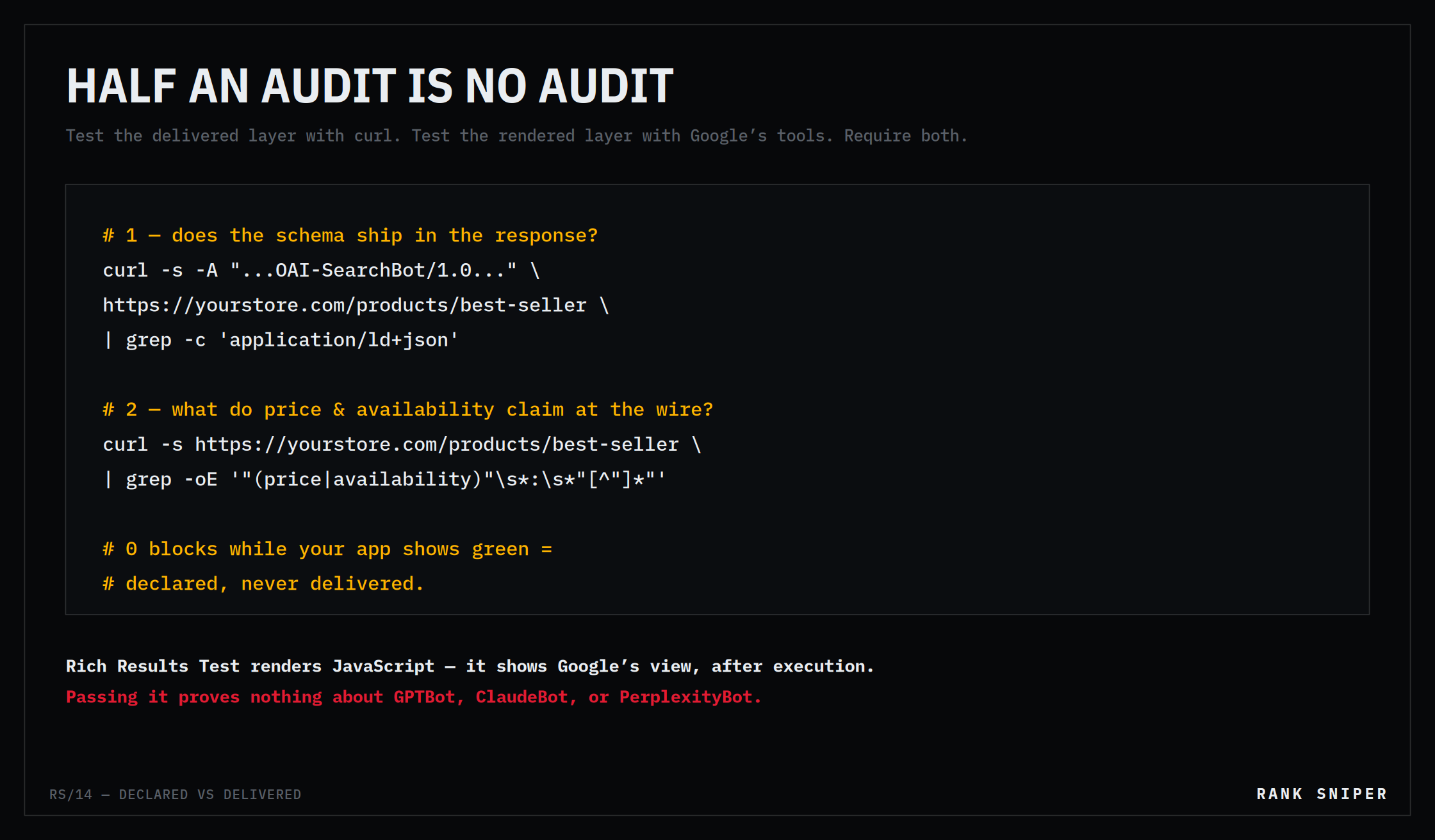 FIG.04 — The two commands that settle it. The Rich Results Test renders JavaScript before it judges you; curl does not, which is exactly the point.
The fixes follow from the diagnosis, in order of leverage: move JSON-LD into the server-rendered template (Liquid, not app script) so it ships in the response; bind availability and price to actual product objects instead of literals; declare per-variant offers; keep substantive content — descriptions, specs — in the initial HTML and reserve JavaScript for enhancement, not existence.
Delivered is necessary. It still isn't sufficient.
Here's this article's honest caveat, mirroring the last one: getting your data into the delivered response wins you legibility, not completeness. A perfectly server-rendered Product block can still be missing the fields that decide whether an agent will act — a stable identifier, an unambiguous variant identity, the attributes that let a machine match your product to a buyer's constraint. Delivered-but-thin is the next failure mode up the stack, and it gets its own teardown.
The discipline this article hands you is the habit underneath all of it: never trust the declared layer. Not the app dashboard, not the theme changelog, not the green checkmark. The only version of your store that exists to an AI agent is the one that comes back over the wire — so that's the version you audit. We build verification tooling for exactly this layer, and the founding principle is the same one you just practiced with curl: measure what machines receive, not what specs declare.
Marcus's fix, for the record, was two of the six classes: app-injected schema and a hardcoded InStock. Neither was visible in his browser. Both were obvious in view-source. Fifteen minutes of looking at the delivered truth beat a year of trusting the declared one.
Sources & further reading
- Google — Understand the JavaScript SEO basics / How Googlebot renders pages (the rendering pipeline AI crawlers don't replicate): https://developers.google.com/search/docs/crawling-indexing/javascript/javascript-seo-basics
- Vercel — The rise of AI crawlers (log-scale analysis of GPTBot, ClaudeBot & co., including JavaScript execution behavior): https://vercel.com/blog/the-rise-of-the-ai-crawler
- OpenAI — Overview of OpenAI crawlers: https://platform.openai.com/docs/bots
- Anthropic — Does Anthropic crawl data from the web?: https://support.claude.com
- schema.org — Product / Offer / ItemAvailability definitions: https://schema.org/Product
- Shopify — Theme architecture (server-rendered Liquid templates): https://shopify.dev/docs/storefronts/themes/architecture
Rank Sniper — Field Notes. Catalog legibility and AI-visibility verification for Shopify. We verify what AI agents actually receive from your store; we don't generate content and hope. Verifier, not generator.